Free Video Compressor With No Upload Required
If you need to shrink MP4, MOV, WebM, AVI, or MKV files without sending them to a server, Localsquash runs FFmpeg in your browser so compression stays private, local, and free.
You have a large video to send, but the usual options are all annoying in different ways. Email rejects it. Slack or Discord says it is too big. A typical online compressor wants you to upload the file first, wait in a queue, and hope the result is worth downloading.
That friction is exactly why people search for phrases like free video compressor no upload, compress video without uploading, and private video compressor. They do not just want a smaller file. They want a faster, simpler, more private way to get there.
Localsquash is built for that use case: shrink a video locally in your browser, keep the file on your device, and download the result when it is ready.
Quick Answer
Direct answer
A video compressor with no upload required compresses the file on your device instead of sending it to a remote server first. Localsquash does this in the browser with FFmpeg WebAssembly, which means you can reduce file size for email, Slack, Discord, WhatsApp, or storage while keeping the original video local.
Best fit: one-off or occasional compression jobs where privacy, convenience, and speed-to-start matter more than batch processing or deep desktop-level tuning.
Private by design
Your video stays on your device from import to download, which is the main reason people search for a no-upload video compressor.
Faster to start
You skip the upload queue and start compressing immediately instead of waiting for a cloud transfer.
Free for everyday use
Localsquash focuses on practical compression without watermarks, forced sign-ups, or premium gates.
Built for real sharing limits
Use it when a video is too large for email, Slack, Discord, WhatsApp, or a client review workflow.
A no-upload video compressor does the encoding on your device, not on a company’s server.
What “No Upload Required” Really Means
When people search for video compressor no upload, they usually mean one of three things: they do not want to wait for a large file to upload, they do not want a private video on a third-party server, or they do not want to install heavy desktop software for a simple task.
In practical terms, no upload means the compression engine runs locally. The browser loads the app and the FFmpeg engine, then your device does the work. That is why this kind of tool is also described as a browser video compressor, on-device video compressor, or private video compressor.
- No upload means no server transfer is required before compression starts.
- Local processing means your CPU and browser handle the encoding work.
- Better privacy means you avoid creating a cloud copy of the video for the basic compression workflow.
Why Most Online Video Compressors Feel Frustrating
Traditional cloud compressors are not always bad, but they are a poor fit for the exact problems that send people searching for a free video compressor with no upload required.
Compression starts after the upload
With cloud tools, the slowest part is often getting the file to the server before any compression happens.
Your file leaves your device
That can be fine for disposable clips, but it is a real concern for personal, medical, legal, or internal business video.
Free tiers are usually restrictive
Many tools cap file size, limit output quality, or block the final download unless you upgrade.
Convenience often hides trade-offs
A simple interface sounds good until you hit watermarks, ads, queues, or hard limits on mobile and desktop.
Desktop tools solve some of those issues, but they introduce a different kind of friction: installation, more technical settings, and a workflow that can feel heavier than the task. That is why Localsquash sits in the middle. It keeps the convenience of a website while preserving the privacy benefits of local processing.
Can a Website Compress Video Without Uploading It?
Yes. A website can compress video locally when the encoding engine runs inside the browser instead of on a remote server. Localsquash uses FFmpeg compiled to WebAssembly, so the browser behaves more like a lightweight app than a simple upload form.
FFmpeg handles the real compression work
FFmpeg is a widely used multimedia toolkit for re-encoding, resizing, trimming, and converting video. Localsquash uses that engine in the browser so the compression logic is not a toy or a black box.
WebAssembly lets the browser run it locally
WebAssembly is the browser technology that makes this kind of local processing practical. Instead of shipping the file to a server, the browser downloads the compression engine and runs it on your device.
Your device controls the speed and the limits
Processing speed depends on your CPU, available memory, and the file itself. That is the trade-off for private local processing: you skip the upload, but the heavy lifting is done by your own hardware.
In plain English: your browser downloads the video compression engine once, then uses your device to make the file smaller. That is why a no-upload compressor can be both private and convenient.
Localsquash vs Cloud Compressors vs HandBrake
If you are comparing options, the real question is not just which tool compresses video. The real question is which workflow best fits the file, your privacy needs, and how much setup you want to tolerate.
| Factor | Typical cloud compressor | Localsquash | Desktop app |
|---|---|---|---|
| Upload required | Yes. The file must be transferred before compression begins. | No. Compression starts in your browser after you pick the file. | No. Files stay local after you import them. |
| Privacy | A server-side copy exists at least temporarily. | Your file stays on your device throughout the process. | Your file stays on your device throughout the process. |
| Setup | No install, but upload and download are part of the workflow. | No install and no upload. Open the page and compress. | Software install required before you can start. |
| Ease of use | Often simple, but free tiers can be limiting. | Simple defaults with optional trim, crop, resize, and quality controls. | Most flexible, but usually more technical. |
| Best fit | Public or low-sensitivity files on fast internet. | Private files, quick one-off jobs, and no-install convenience. | Batch processing, long exports, and advanced workflows. |
If you want a deeper desktop comparison, read our HandBrake alternative guide. The short version is simple: Localsquash is best when you want privacy and zero-install convenience, while a desktop app is still better for batch jobs and deeper tuning.
How to Compress a Video Without Uploading It
Here is the simplest workflow for compressing a video locally in your browser.
Add your video
Open the Localsquash video compressor and drag in your file or browse from your device. Common formats include MP4, MOV, WebM, AVI, MKV, and WMV.
Adjust only the settings you need
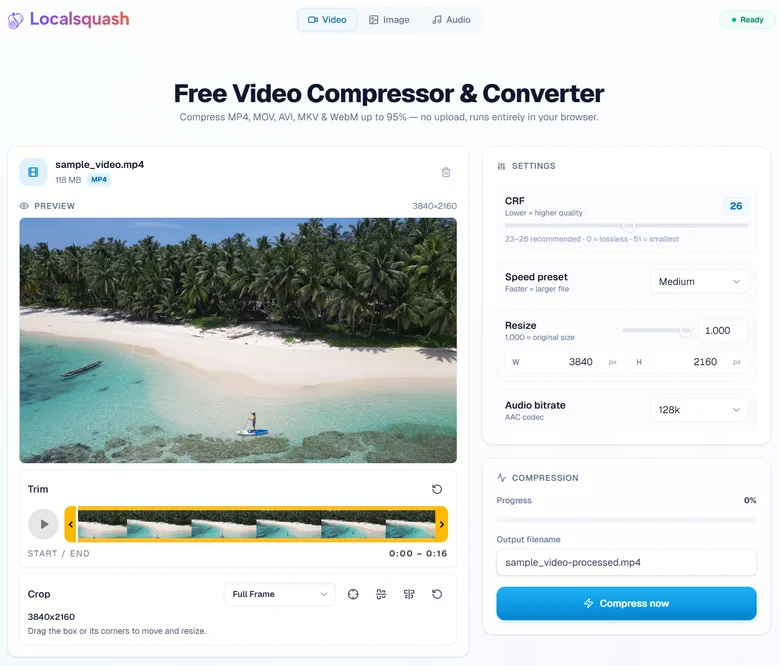
Localsquash works with sensible defaults, but you can also trim, crop, resize, and change the quality target if the first pass is not small enough.
- Trim to remove seconds you do not need.
- Crop to remove empty space or black bars.
- Resize when resolution is a bigger problem than codec quality.
- CRF when you need a more precise size versus quality trade-off.
CRF in one line: a higher CRF usually means a smaller file and lower visual quality, while a lower CRF usually means a larger file and better visual quality.
Compress and download
Click Compress, let your device process the file, the compressed file is then automatically downloaded with a new filename of your choice. That keeps the workflow fast and practical without adding extra accounts, queues, or checkout screens.
Practical compression advice
- Trim first if you do not need the full clip.
- Resize before pushing quality too hard when the file is still far too large.
- Use CRF for fine control when you are close to a target size and want to preserve quality.
When a No-Upload Video Compressor Makes Sense
Localsquash is built for people who need to make a video smaller without turning the task into a project.
- Getting an email attachment or chat upload under a platform size limit.
- Compressing private family, client, legal, or internal business video without sending it to a third-party server.
- Shrinking screen recordings, webcam clips, or phone video before sharing.
- Working on slow or unstable internet where upload time is the bottleneck.
- Making a video smaller quickly without installing a full desktop editor.
When Localsquash Is the Right Tool, and When It Is Not
Choose Localsquash if...
- You want the fastest path from file selection to finished download.
- You care about privacy and would rather avoid creating a server-side copy.
- You only need one file or a few files compressed with sensible controls.
- You want a browser workflow that still gives you trim, crop, resize, and CRF control.
Use a desktop app instead if...
- You are batch-processing many files at once.
- You need deeper codec tuning, presets, or a longer post-production workflow.
- You are exporting very long videos and want a dedicated desktop environment.
- You already work inside a desktop toolchain and do not mind the extra setup.
Localsquash is not trying to replace every desktop workflow. It is trying to remove the friction from everyday compression.
Frequently Asked Questions
The Bottom Line
If your goal is simple - make a video smaller without uploading it - a browser-based local workflow is the cleanest answer. Localsquash gives you that workflow with real FFmpeg-powered compression, practical controls, and no account in the middle.
The next time you need to compress a video for email, Slack, Discord, WhatsApp, storage, or client review, you do not need to start by handing the file to a server. You can start on your own device instead.
Ready to compress your first video?
No account needed. No watermark. Your video stays on your device.
Compress a Video Now - Free